Activating the Microphone
Jack
To record with a microphone, you
must activate the microphone jack in your computer. To do this, double click
the yellow volume icon  on
the task bar. A window will open. Click on Options, and select
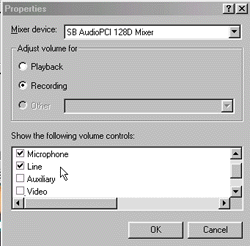
Properties. You will now see a window like the following:
on
the task bar. A window will open. Click on Options, and select
Properties. You will now see a window like the following:
 |
|
Be sure to select Recording. After that, put check marks into the boxes
next to Microphone and Line (as shown in the window above). Press
OK.
Now you will see the recording control
that includes panels for Microphone and Line:
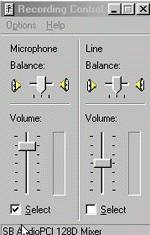
Be sure to select Microphone
(as shown in the window above).
back to using your
pc as a tape recorder