How to Re-Size the Display of an Image
Using Netscape Composer
Important!
Click here first
to read Fair Use Guidelines for Creating Multimedia Projects
|
NOTE:
|
The image will appear in the size you specify when it is viewed using
Netscape Composer. To have the image display in this same size when viewed
with other browsers, the image must be re-sized in a graphics program like
Adobe Photoshop.
|
- Move your mouse pointer
over the image and RIGHT-click.
A drop-down menu will
appear.
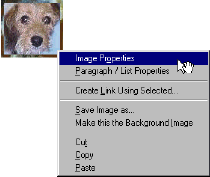
- Click on "Image
Properties."
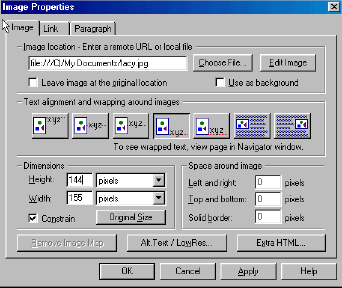
The "Image Properties"
box will appear.

- Enter the height and width
you want for the image display in pixels (72 pixels are equivalent to one inch).
| NOTE: |
Click in the check
box next to "Constrain" if you want the ratio of height to width
to remain the same. If you choose not to select this option, your image
may appear distorted when you re-size it.
|
- Click on the "APPLY"
button and then click on the "OK" button.
Author: Susan Campbell
scampbel@gmu.edu
June 1, 2001